Choose a Christmas film that fits your family’s evening
Compare up to three films by running time, content and the audio or accessibility options your family needs. Use the choice sheet to work out what fits tonight and what you still need to check.

You have time for a Christmas film, but perhaps not the long version you have found. Or the copy on your television might not offer the subtitles someone needs. Before everyone settles down, start with the evening you have and check a few possible films against it. One is enough; comparing up to three gives you a backup without spending the evening searching.
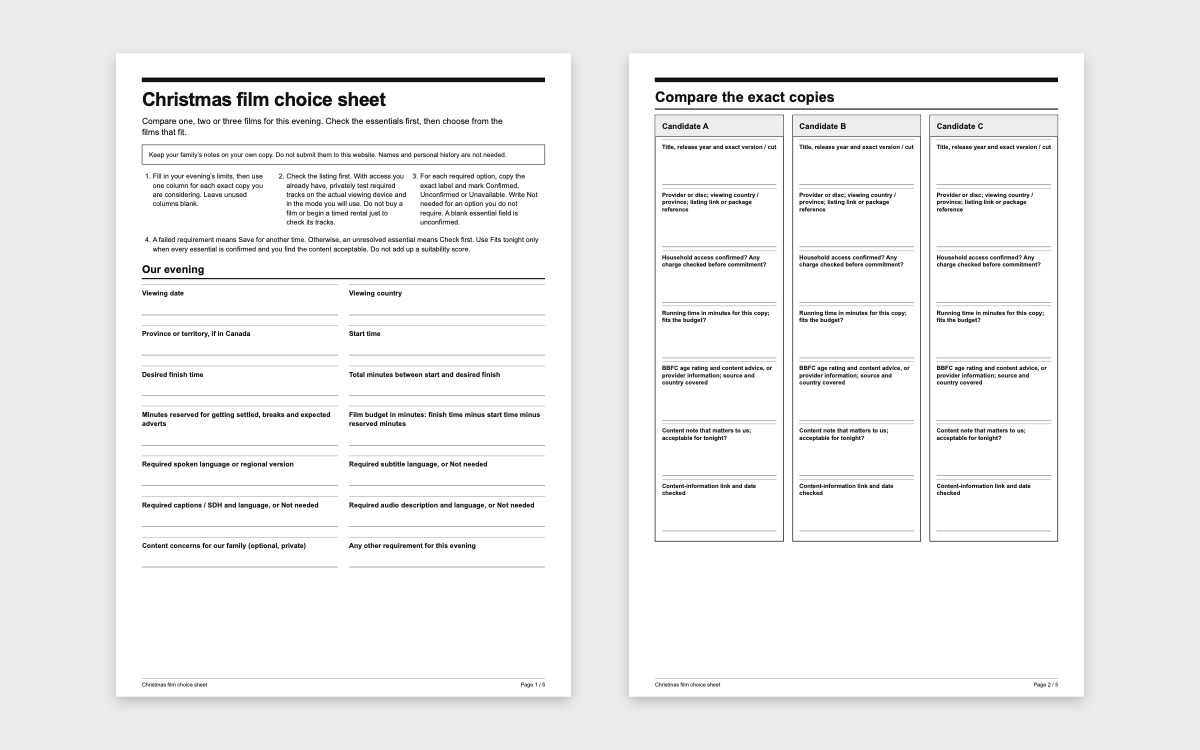
The Christmas film choice sheet (PDF) and accessible choice sheet have the same prompts. Print a copy or use them in your own notes. Your family’s notes stay with you: there is nothing to submit to this website.
Work out how much time you have
Write down when you can start and when you want to finish, then work out the number of minutes between them. Allow for getting settled, breaks and any adverts you expect, then subtract that allowance from the total. The time left is your film budget. This allowance is your household’s planning estimate, not a recommendation about screen time.
Use the running time for the exact copy you intend to watch. Note the title, release year and version or cut, as well as the streaming service or disc. If two listings give different lengths, check whether they refer to the same version. Do not average them. If the running time is unknown, it still needs checking. A film that fills your budget exactly fits on paper, but leaves no spare time beyond the allowance you have made.
Check whether your household can actually watch that copy tonight. If there is a charge, confirm it before committing. A title appearing in search results does not mean you have access to it.
Read the age rating and content advice together
For a UK release, use the search on the BBFC’s guide for parents to look up the film. Read its age rating alongside the content advice, and match the record to the release you are considering. Check that you have the film itself, rather than a trailer, extra or different cut. Record the source and the date you checked it.
BBFC ratings appear on cinema releases, DVDs and Blu-rays, and on some streaming services. Do not assume that every streaming listing uses a BBFC rating. If you cannot find a matching BBFC record, read the provider’s content information and record who supplied it. Do not give the film a rating yourself.
Then consider what the information means for your family. Separation or the loss of a family member might matter more to your child than another issue. Read fuller content advice where available, on your own if you want to avoid sharing spoilers. An age rating helps you decide; it does not promise that every child will feel comfortable. The absence of a warning does not prove that a particular scene is absent.
A short note is enough: what matters to you, where you found the information and whether the content is acceptable for tonight. You do not need to write down children’s names or their personal history.
Check each language and accessibility option
First decide what is essential. Does someone need a particular spoken language or regional version? Subtitles in a particular language? Captions or subtitles for deaf and hard-of-hearing viewers, often labelled CC or SDH, provide information beyond the dialogue. Audio description, often labelled AD, describes visual information aloud. Ordinary subtitles may not provide everything a viewer needs, so check both the language and the feature. Apple’s accessibility guide explains these labels and where to find them in its app.
Copy the exact label for each option you need. A translated film description or menu does not confirm that the soundtrack is available in that language. A general language label may not identify the regional version you want, either. Write ‘Not needed’ beside options your household does not require and ‘Unconfirmed’ beside essentials you have not yet verified. An empty box must not look like a yes.
Start with the film’s information page. Some options are only selectable in the player: Apple’s playback instructions, for instance, explain how to choose audio and subtitles while a video is playing. If you already have access, check a short section privately on the device you will use together. Make sure you can select the required tracks and that the sound and text work as expected. This technical check does not tell you whether the whole film’s content is suitable.
Do not buy a film or start a timed rental just to find out whether an essential track is available. If the listing does not answer your question and you cannot check using access you already have, ask the provider or leave the film marked ‘Check first’.
Note the device and whether you checked a stream, download or disc. Netflix’s language guidance explains that options can depend on location, profile preferences, title and device, and that downloads may offer fewer languages than streaming. A check on your phone therefore does not settle what will work on a different device or in a downloaded copy.
Choose from the films that meet your requirements
Give each film one of three decisions. If a requirement has already failed, mark ‘Save for another time’. That might mean the film is too long, its content is not acceptable for your family tonight or an essential track is unavailable. If nothing has failed but an essential detail remains unknown, mark ‘Check first’. Use ‘Fits tonight’ only when the running time fits, household access and all required tracks are confirmed, and you have read the content information and found the content acceptable for tonight.
These requirements are separate; there are no points to add up. A favourite story cannot make up for missing captions that someone needs. Once the checks are complete, everyone can help choose from the films that fit. If you are only considering one film, leave the other two columns blank.
Here is a fictional example with invented running times, not real film recommendations. From 6.30 pm to 8.15 pm is 105 minutes. Allowing 15 minutes for getting settled and breaks leaves a 90-minute film budget.
- Candidate A lasts 86 minutes, but the required spoken audio is unconfirmed: Check first.
- Candidate B lasts 102 minutes, which is over the budget: Save for another time.
- Candidate C lasts 78 minutes. Access and all required tracks are confirmed, and the family finds the content acceptable: Fits tonight.
Candidate C meets this family’s requirements for this evening. If none of your films fits, choose a familiar shorter option you have already checked, or do something else together. The longer film can wait for another evening.
Keep the plan flexible
Write down your first choice, an optional backup and your planned finish time. Agree before you start that anyone can ask to pause, stop or switch. Choosing a film does not mean everyone has to finish it.
Only add a pause scene and approximate time if you already know the exact version and have checked the scene. Otherwise, leave that optional space blank. A time taken from another cut is not a reliable cue, and planning a pause does not remove unwanted content. You can prepare for the evening and still change your mind once it starts.
 21
21 22
22 23
23